Transforms
Overview
Doodle supports rotating, scaling, translation, and reflections with the Transform algebra. In theory, you can apply any transform to any picture. In practice, some transforms are more useful with some pictures than others. For example, a circle will look the same no matter how much you rotate it, but a square will look different.
In the following code, we create a hut (a triangle on top of a rectangle) and apply rotation, scaling, translation and vertical reflection to it.
import doodle.core.*
import doodle.java2d.*
import doodle.syntax.all.*

val hut =
  Picture
    .triangle(50, 50)
    .fillColor(Color.black)
    .strokeColor(Color.red)
    .above(Picture.rectangle(50, 50).fillColor(Color.blue))

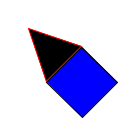
val rotatedHut = hut.rotate(45.degrees)
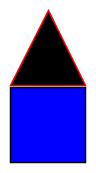
val scaledHut = hut.scale(1.5, 1.5)
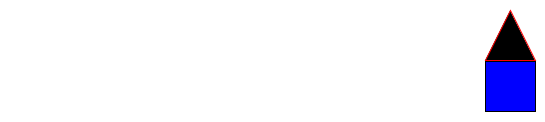
val translatedHut = hut.translate(500, 50)
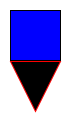
val verticallyReflectedHut = hut.verticalReflection
Rotation
The rotate method rotates a picture by a given angle. The angle is specified in radians, but you can use the degrees method to convert degrees to radians. Here we rotate the hut by 45 degrees.
Scaling
The scale method scales a picture by a given factor in the x and y directions. Here we scale the hut by 1.5 in both directions.
Translation
The translate method moves a picture by a given amount in the x and y directions. Here we move the hut to the point (500, 50).
Reflection
The verticalReflection method reflects a picture vertically. Similarly, the horizontalReflection method reflects a picture horizontally.
Implementation
These methods are available on Transform algebra. Rotation and scaling are available on Image as well.